You’ve seen it happen. Fifteen minutes into the keynote, half the room is on their phones. The speaker is good and the topic is relevant, but people have checked out. Nine times out of ten the problem isn’t the speaker. It’s the audio visual content wrapped around them.
Audio visual content is any material that combines sound and visuals to communicate a message: slides, videos, motion graphics, live camera feeds, and the audio that carries them. It drives engagement because attention follows clarity: audiences disengage fast when they can’t hear cleanly or read a screen from the back row.
An audio visual content strategy works best in this order: audio first, screens second, hybrid delivery third, reuse last.
| Priority | What to fix | Why it comes first |
| 1 | Audio clarity | Poor sound empties a room faster than anything |
| 2 | Screen legibility | Unreadable slides stop the message at row five |
| 3 | Hybrid feed quality | Remote viewers only ever see the camera |
| 4 | Content reuse | One event should produce months of assets |
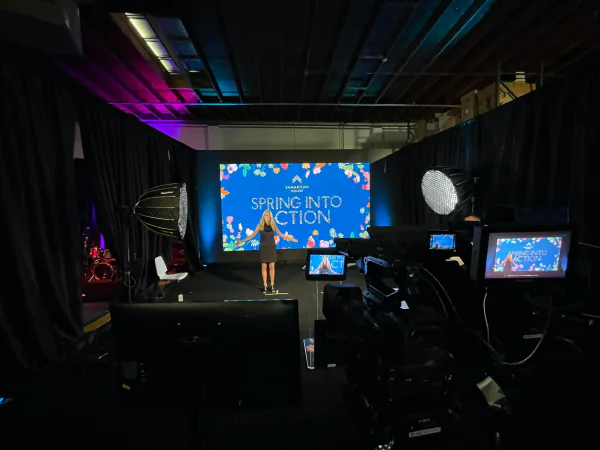
What Is Audio Visual Content, and Why Does It Decide Engagement?
Audio visual content is the sound-and-picture layer of your event: slides, video packages, motion graphics, walk-in loops, live camera feeds, and the mics and speakers delivering it all. Audio visual production is the process of building and running that layer, from content design through show day.
Engagement rises and falls on it because attention is a clarity problem before it’s a creativity problem. AVIXA research found that 70% of corporate event attendees rate audio quality as their top requirement for a good experience. That’s a hearing threshold, not a design preference.
| Layer | What it covers | Engagement job |
| Audio | Mics, speakers, mixing, monitors | Makes the message audible everywhere |
| Screen content | Slides, video, graphics, LED wall playback | Makes the message readable and memorable |
| Capture | Cameras, switching, live streaming, recording | Makes the message reach past the room |
Most planners budget for the middle row and improvise the other two, which is exactly backwards. It’s the gap VEP’s audio visual services are built to close.
Fix the Audio Before You Touch the Visuals
Sound is half of audio visual content and gets a fraction of the attention. Feedback, a lavalier rubbing on a collar, a panel where one mic works: each costs you the room in seconds, and unlike a bad slide, bad audio can’t be ignored. Three fixes cover most failures:
- Mic the format, not the person: panels need one mic per speaker, workshops need a handheld for questions.
- Test with a full room in mind: bodies absorb sound, so an 8 a.m. soundcheck isn’t the real thing.
- Give remote viewers a clean feed: send the mixing board output, never a camera’s built-in mic.
That last one matters most for hybrid audiences, who have no room cues when sound goes muddy.
Design Screen Content People Can Actually Read
Slides fail for measurable reasons. If the person in the back row squints, your audio visual content just lost them.
| Rule | Get it right |
| Font size | Minimum 24pt on slides; 30pt+ for a large ballroom |
| One idea per slide | If it needs a paragraph, it belongs in the talk, not the deck |
| Contrast | Light text on dark backgrounds reads better under stage lighting |
| Safe area | Keep content out of the bottom third; heads block it |
LED walls change the math. A 16:9 deck stretched across a 32:9 wall wastes half your canvas, so build audio visual content at the real output resolution and use the extra width for branding or session titles. That’s where a deck becomes designed event graphics, and why graphics and signage is a production discipline rather than an afterthought.
Build for Hybrid and Remote Viewers From Day One
Remote attendance is standard now: around 69% of organizers use virtual or hybrid formats to widen reach, 54% say virtual elements increased attendance, and roughly 70% treat hybrid events as permanent.
The trap is treating the stream as a recording of the room. Remote viewers get your audio visual content through one rectangle, so framing, cut timing and on-screen graphics carry the whole experience.
- Cut to slide feeds directly, not a camera pointed at a screen
- Frame speakers tighter than feels natural in the room
- Add captions: they lift completion rates and accessibility at once
- Give the stream its own host to bridge gaps the room doesn’t notice
Planning this from the start is the difference between hybrid events that hold an audience and ones that quietly lose it.
The same rules apply, only more strictly, to virtual and online events, where the feed is the event rather than a window onto it.
Make Interactivity Part of the Content, Not a Gimmick
Live polling, Q&A walls and second-screen apps only raise attendee engagement when their output appears on the main screen. A poll nobody sees results from is a survey, not an interaction. Build the reveal into the run of show: ask, show the live tally on the LED wall, then have the speaker react. That loop turns passive viewing into participation at well-produced corporate events.

Plan the Content You’ll Use After the Event Ends
A one-day event should produce months of material, but only if you plan capture in advance. More than a third of webinars still draw views three months after the live session, and videos under 60 seconds generate roughly 2.5x more engagement per impression than any other format. Your keynote is raw material for both.
| Asset | Source it from | Typical use |
| Highlight reel | Multi-camera capture + b-roll | Next year’s promotion |
| Session clips | Isolated recordings per session | Social, sales follow-up |
| On-demand library | Full recordings with captions | Lead capture, member value |
Capturing b-roll during the event costs almost nothing; recreating it afterward is impossible. Fold event video production into the brief up front and one budget yields a year of assets.
The same applies to digital media content: decide what you want to publish afterward while you can still shoot for it.
Measure Engagement, Not Applause
Planners most often name attendee engagement and event feedback, each cited by 34%, as their top success metrics. Applause isn’t one, so build measurement into the production plan.
| Metric | What it tells you |
| Stream watch time by session | Which content held remote attention |
| Poll and Q&A participation | Whether interactivity actually landed |
| Drop-off timestamps | The exact minute you lost people |
Drop-off timestamps are the most useful and least used: if three sessions all lose viewers at the 12-minute mark, that’s a format problem, not a speaker one.
Common Audio Visual Content Mistakes
| Mistake | Fix |
| Collecting decks on show morning | Set a 72-hour content deadline and test every file |
| One mic passed around a panel | One mic per speaker, always |
| Streaming camera audio | Feed the stream from the mixing desk |
| No plan for the recording | Brief capture and reuse before the event |
Frequently Asked Questions
What is audio visual content?
Audio visual content is any material combining sound and visuals to deliver a message: slides, video, motion graphics, live camera feeds and the audio carrying them. At events it covers everything shown on screen and heard through the speakers, as distinct from the gear delivering it.
How does audio visual content improve attendee engagement?
It improves engagement by removing friction between message and audience: clear audio, readable screens and well-framed camera feeds let people follow without effort. Attention drops sharply when audiences strain to hear or read, so clarity outperforms creativity.
What makes audio visual content work for hybrid events?
Hybrid events need audio visual content designed for a single rectangle: a direct slide feed, board-level audio, tighter speaker framing and captions. Remote viewers have no peripheral context, so anything unclear on screen is lost.
How far in advance should event content be finalized?
Set a 72-hour deadline for final decks and video files, leaving time to test fonts, embedded media, aspect ratios and playback on the real system. Day-of file swaps are the most common cause of on-stage delays.
What should an audio visual production budget include?
Beyond gear rental, budget for content design, a technical rehearsal, a show-day operator and capture for reuse. Rehearsal and capture are the line items most often cut and most often regretted.
Key Takeaways
- Audio visual content drives engagement through clarity first: audio quality outranks visual polish for most attendees.
- Design screens for the back row: 24pt minimum text, one idea per slide, built at the real output resolution.
- Plan hybrid delivery from the start, giving remote viewers a direct slide feed, board audio and captions.
- Brief capture and reuse before the event so one day of audio visual production yields months of assets.
- Measure watch time, participation and drop-off instead of how the room felt.
Ready to Make Your Content Land?
Great events aren’t louder or flashier than the ones that fall flat. They’re clearer. Audio people can hear without effort, screens readable from the back row, a stream made for the people watching it, and a plan for what the footage becomes next.
Rather have a team handle content design, rehearsal and show-day operation? Talk to VEP about your next event. We’ll build the audio visual content around your message and make sure it reaches everyone you invited.